TP-Link US Website Redesign
Competitive Research
A structural read of seven category-leading websites — Apple, DJI, Samsung, Toyota, eero and Google Nest — alongside a baseline audit of the current TP-Link US site. The focus of this report is page framework, information architecture and navigation. Code-layer findings (schema, llms.txt, semantic HTML, robots.txt) are documented in the Appendix.
Key findings
Five structural observations grounded in DOM, sitemap and click-path data captured 2026-05-13 → 2026-05-14. Each finding is reproducible from the artifacts under data/.
- TP-Link's IA is dominated by support content. Of 4,359 indexable URLs, 2,471 (57%) live under
/support/; adding/user-guides/,/configuration-guides/and/document/brings the figure to ≈ 70%. The remaining 30% must carry the entire brand and product story. The PRD's "43–50% of traffic goes to Support" observation reflects what the IA itself has been built to surface. - Top-nav exposure varies by an order of magnitude across the set. eero exposes 24 navigation links; Apple exposes 275 but routes them through a single mega-menu pattern; TP-Link exposes 263 and additionally surfaces four sub-brand logos in the chrome. The number of links is less important than whether one consistent reveal pattern controls them.
- Five of the seven competitors collapse Category → PDP into ≤ 2 clicks. eero achieves it in one. TP-Link's path runs three to four clicks and frequently terminates at an external retailer (Amazon, Best Buy) rather than a native cart. The structural cause is the missing direct-purchase layer, not the visual design of the chrome.
- Organism reuse rate separates mature template systems from one-off pages. Apple reuses 100% of its homepage organisms across category and PDP. eero and Samsung sit above 90%. TP-Link reuses 53%, with six homepage-only organisms (rotating promo banner, sub-brand logo strip, award carousel, ecosystem CTA) that have no equivalent on its other templates.
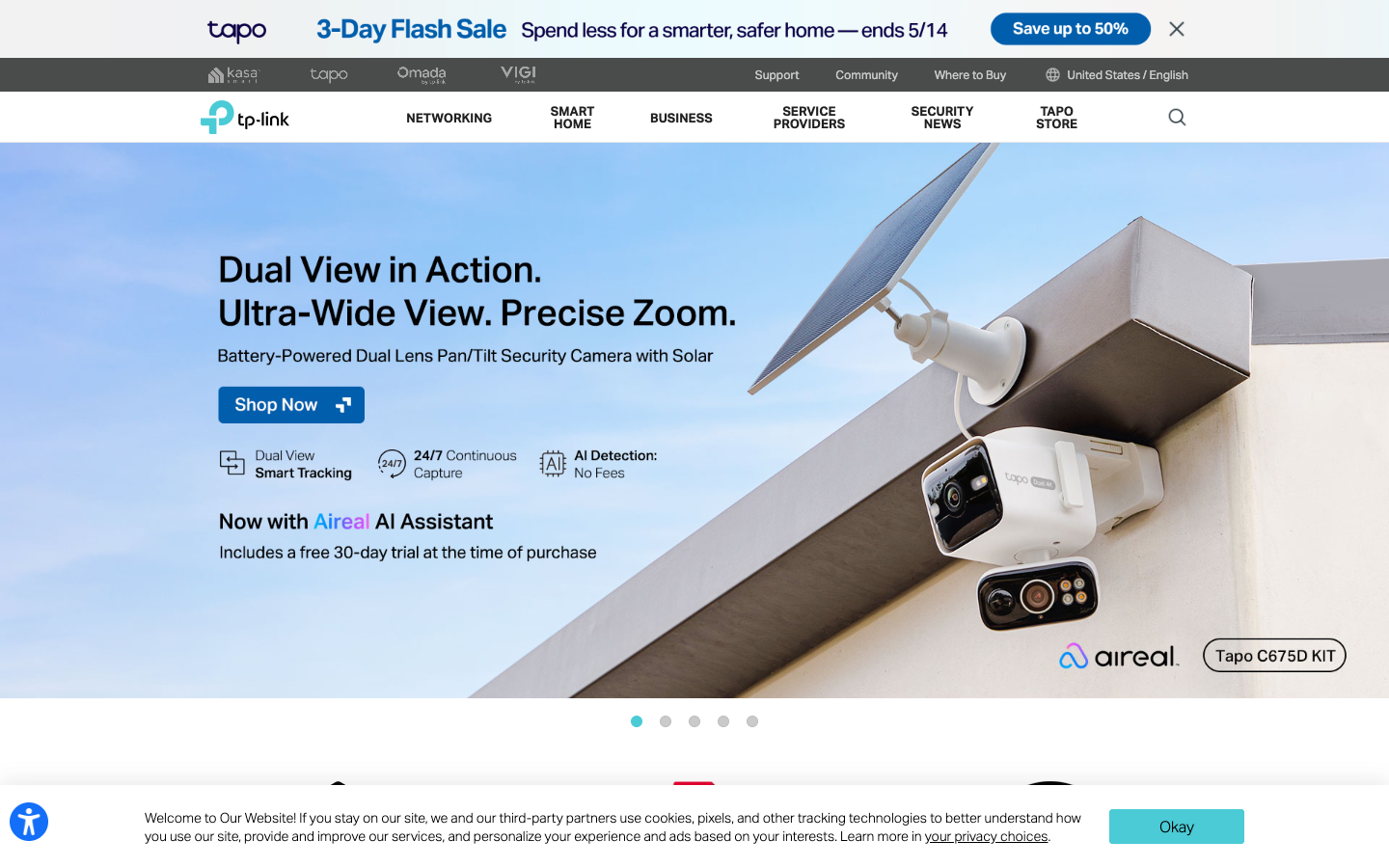
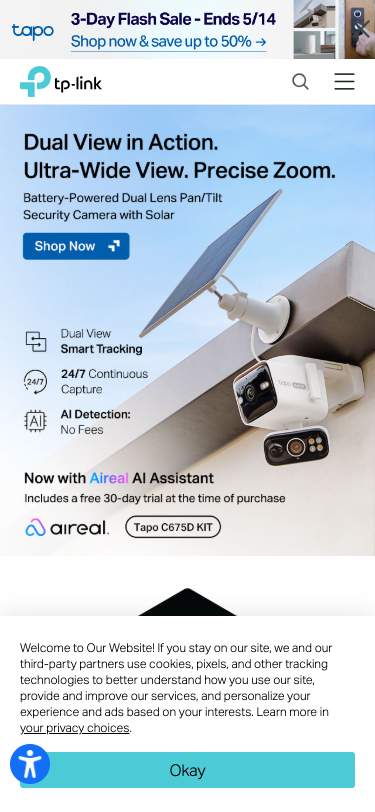
- The current TP-Link homepage opens with promotional content, not brand content. First viewport on the US site, captured 2026-05-14: a Tapo three-day flash sale bar at the top, a four-logo sub-brand strip, then a Tapo C5210 camera carousel slide. The TP-Link parent brand appears only as a wordmark in the top-left.
- Only TP-Link surfaces sibling sub-brands as logos in the chrome. Of the seven sites studied, six subordinate sub-brand identities under the parent: Apple presents Mac / iPad / iPhone as product lines (one type system, no separate logos), Samsung treats Galaxy / Bespoke as model families inside Samsung's own chrome, DJI absorbs Hasselblad and product sub-lines inside dji.com without sub-brand logos, Toyota separates Lexus to a distinct domain. eero has no sub-brands. TP-Link is alone in placing four parallel sub-brand logos (Tapo · Kasa · Aginet · Omada) in the top header, which fragments the parent-brand expression at first glance and forces visitors to decode the sub-brand mapping before navigating.
Methodology
Captured 2026-05-13 → 2026-05-14 from a US residential connection. Seven brands studied at three pages each (homepage, category, product detail page) at desktop 1440×900 and mobile 375×667 viewports.
Brands studied
Eight competitors plus TP-Link itself. Each card jumps to its IA walkthrough. TP-Link's card is highlighted because it is both the subject and the benchmark.
<section> · no llms.txt · sitemap declared as /nl/ in robots. Smart Home dropdown holds only 4 links — Tapo / Kasa product depth lives elsewhere.Structural matrix
Hard signals only — counts and presence flags pulled from sitemap.xml, DOM, and HTTP responses. This is the table that should drive Discovery Readout discussion. TP-Link row highlighted.
| Brand | Indexable URLs | Top-nav links | Semantic tags (sec / art / aside) |
JSON-LD types | llms.txt | Detected stack | Site-wide chat | Hero strategy |
|---|---|---|---|---|---|---|---|---|
Apple apple.com |
846 depth 1–6 |
275 mega-menu |
5 / 0 / 1 | Organization · WebSite · WebPage | ✗ | custom | ✓ support-scoped | Single-product, brand-led |
eero eero.com |
48 flat |
24 4 categories |
2 / 4 / 0 | FAQPage · WebPage | ✓ | Next.js | ✓ | Editorial copy + 1 product |
DJI dji.com |
37× sitemap-index |
78 flat top-bar |
6 / 0 / 0 | — | ✗ | custom | ✓ | Single product hero |
Samsung samsung.com/us |
97× country index |
185 mega-menu |
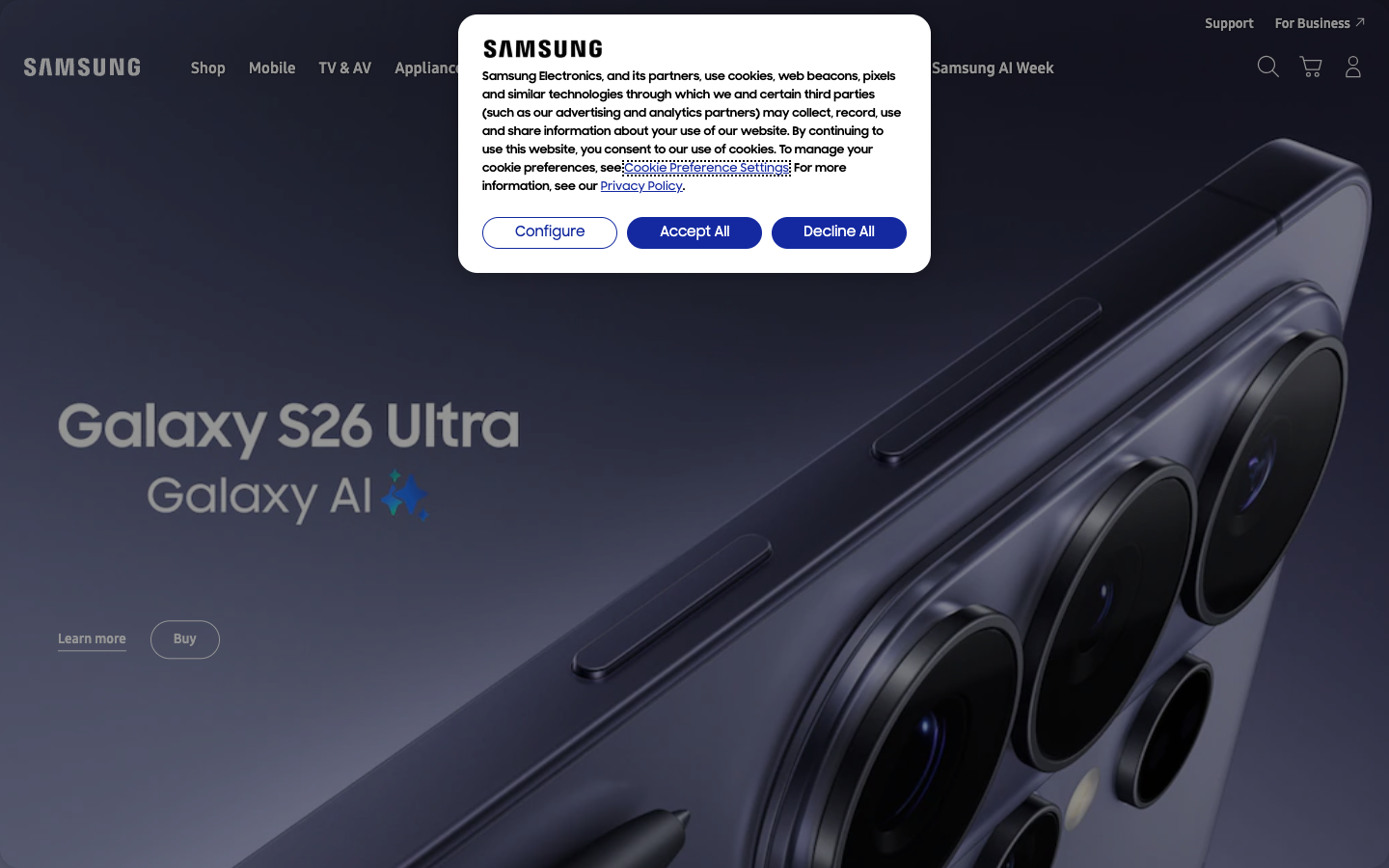
12 / 0 / 0 | Corporation · WebSite · WebPage | ✓ | custom | ✓ | Single product (Galaxy S26) |
Toyota toyota.com |
76 marketing only |
272 mega-menu |
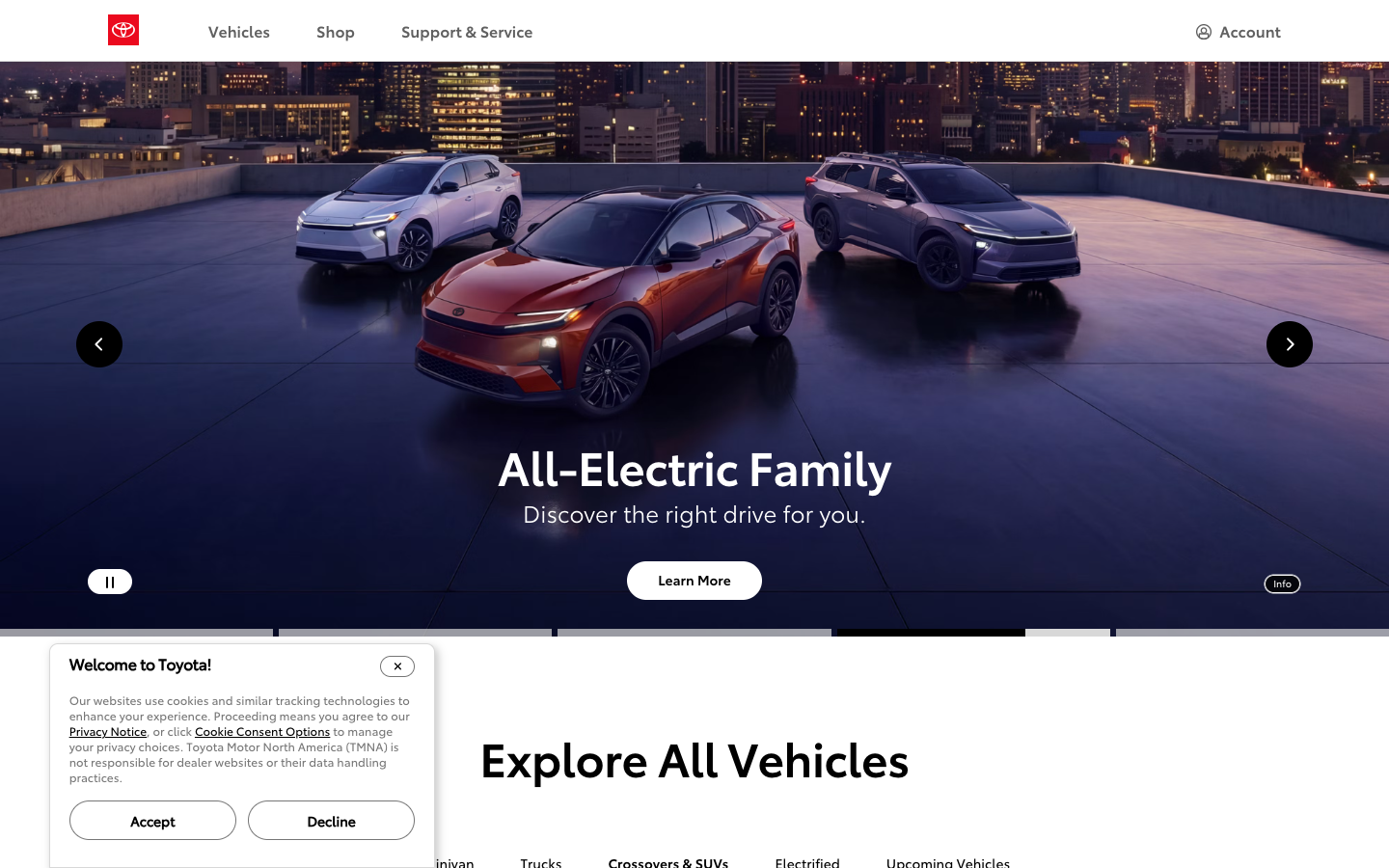
5 / 1 / 0 | WebPage | ✗ | custom | ✓ | Carousel + EV family |
Nest store.google.com |
36× country index |
0 no <nav> |
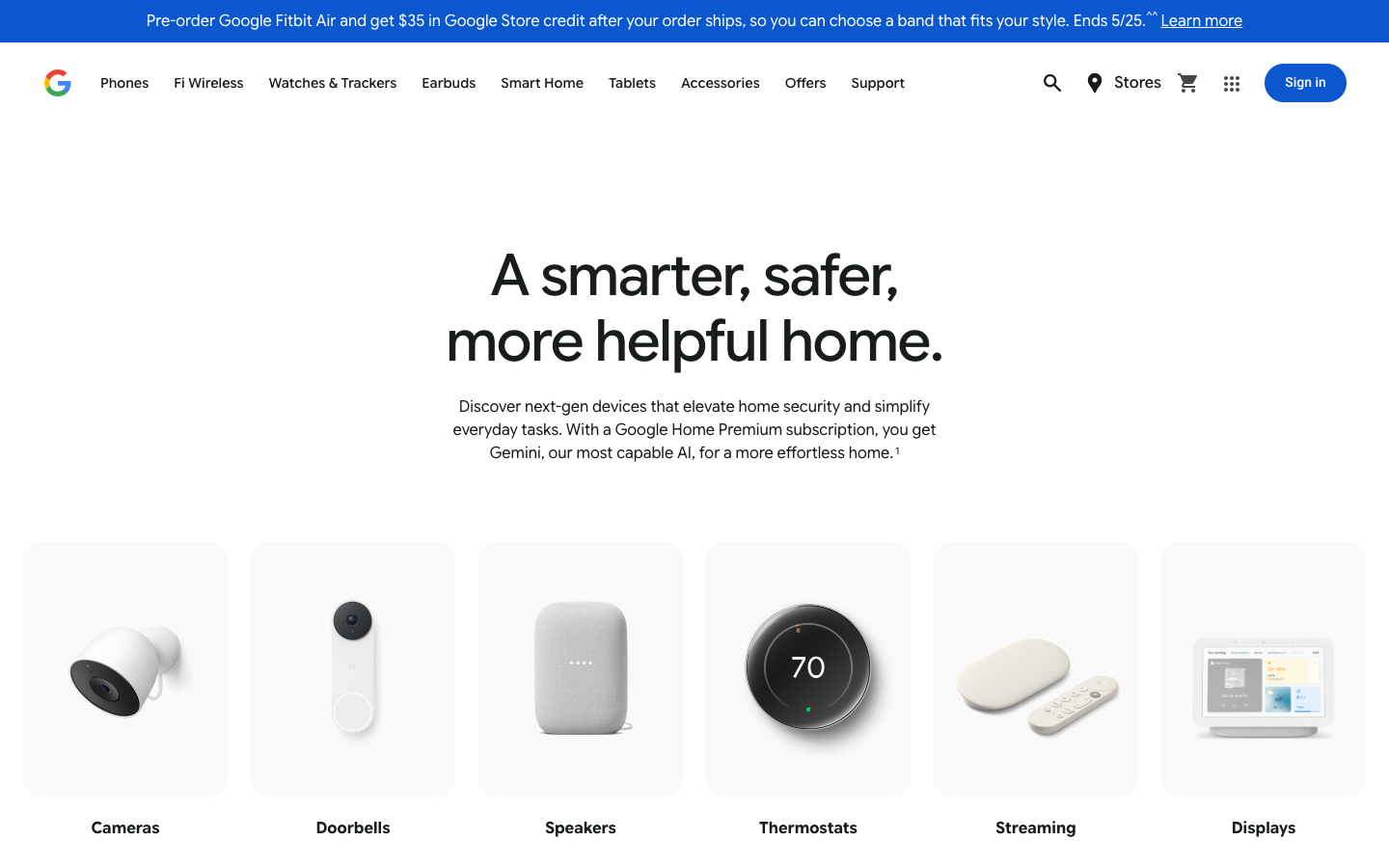
75 / 78 / 221 | Organization | ✗ | custom (Google) | ✗ | Brand line + product grid |
NETGEAR netgear.com |
— sitemap private |
9 flat + L2 |
1 / 0 / 1 | WebSite · Organization | ✓ | React (Chakra UI) | ✓ | Hero + 4 business tiles |
TP-Link tp-link.com/us |
4,359 70% support |
263 multi-brand |
0 / 0 / 0 | WebSite | ✗ | legacy CMS | ✓ Areal | Tapo promo + camera SKU |
Apple
apple.com- Hero strategy
- Single product, brand-led
- Sub-brands in chrome
- 0 (one parent brand)
- Primary product lines
- 9
- Click depth · home → PDP
- 2
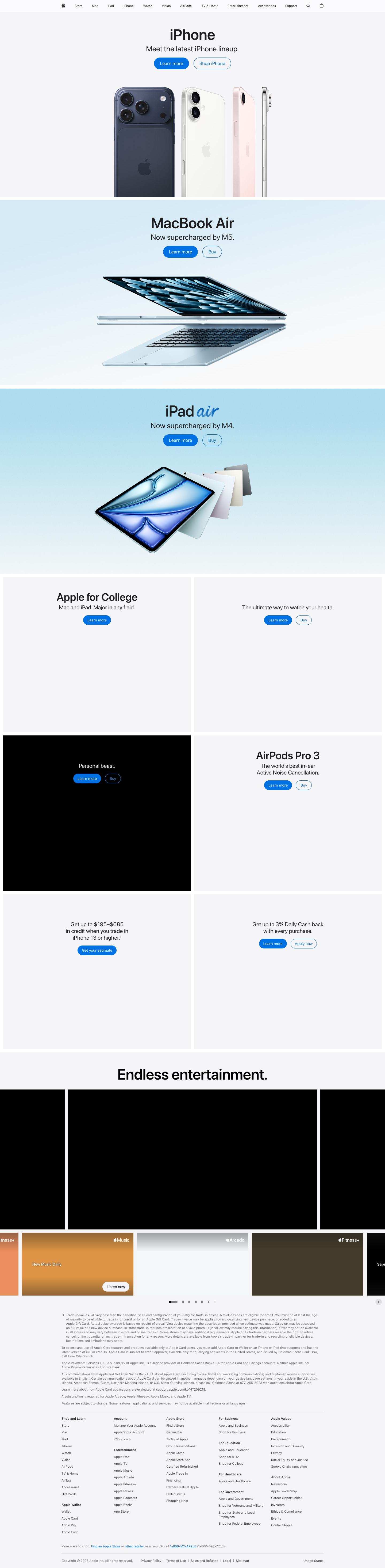


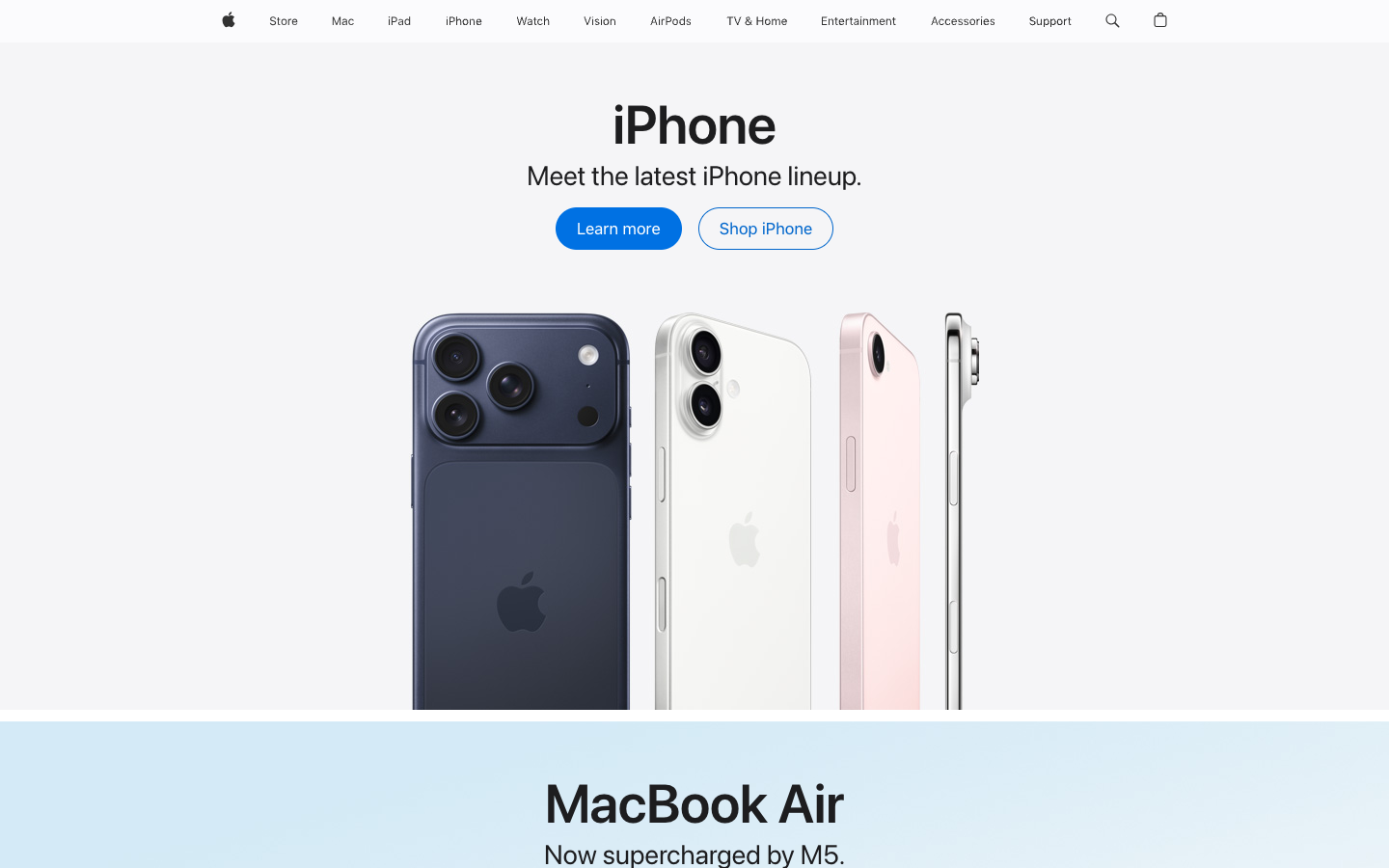
A near-empty top chrome of plain wordmarks (Apple · Store · Mac · iPad · iPhone · Watch · Vision Pro · AirPods · TV & Home · Entertainment · Accessories · Support) sits above a single product moment — currently MacBook Air on M5 — set against a neutral background.
The hero pairs a one-line product name, a one-line value statement and exactly two buttons (Learn more / Buy). There is no promotional unit, no banner stack, no carousel, no sub-brand badging. Visual rhythm is set by white space rather than borders or shadows.
Scroll one screen and a second product takes the same hero treatment (iPhone). Scroll again and a third (iPad). The page is a vertical sequence of single-product chapters — each chapter a near-clone of the one above — terminating in a footer link grid.
Brand-led, single-product. Above-the-fold is approximately 5% logo / 90% product photograph / 5% CTA. No promo, no sub-brands, no service plug.
Sub-brand & product line structure
Information architecture
User-facing IA — the 11 entries surfaced in the top chrome. Below the chrome the sitemap holds 846 indexable URLs, but corporate / utility paths (/legal/, /education/, /business/, /retail/, /feedback/, etc.) are footer / utility, not primary nav.
/legal/ 140 URLs, /education/ 96 etc.) are accurate to the sitemap, but they describe what Apple ships, not what Apple navigates users to. The IA shown above is what visitors see in the chrome. Sitemap-as-IA is appended to the Appendix for completeness.
Navigation
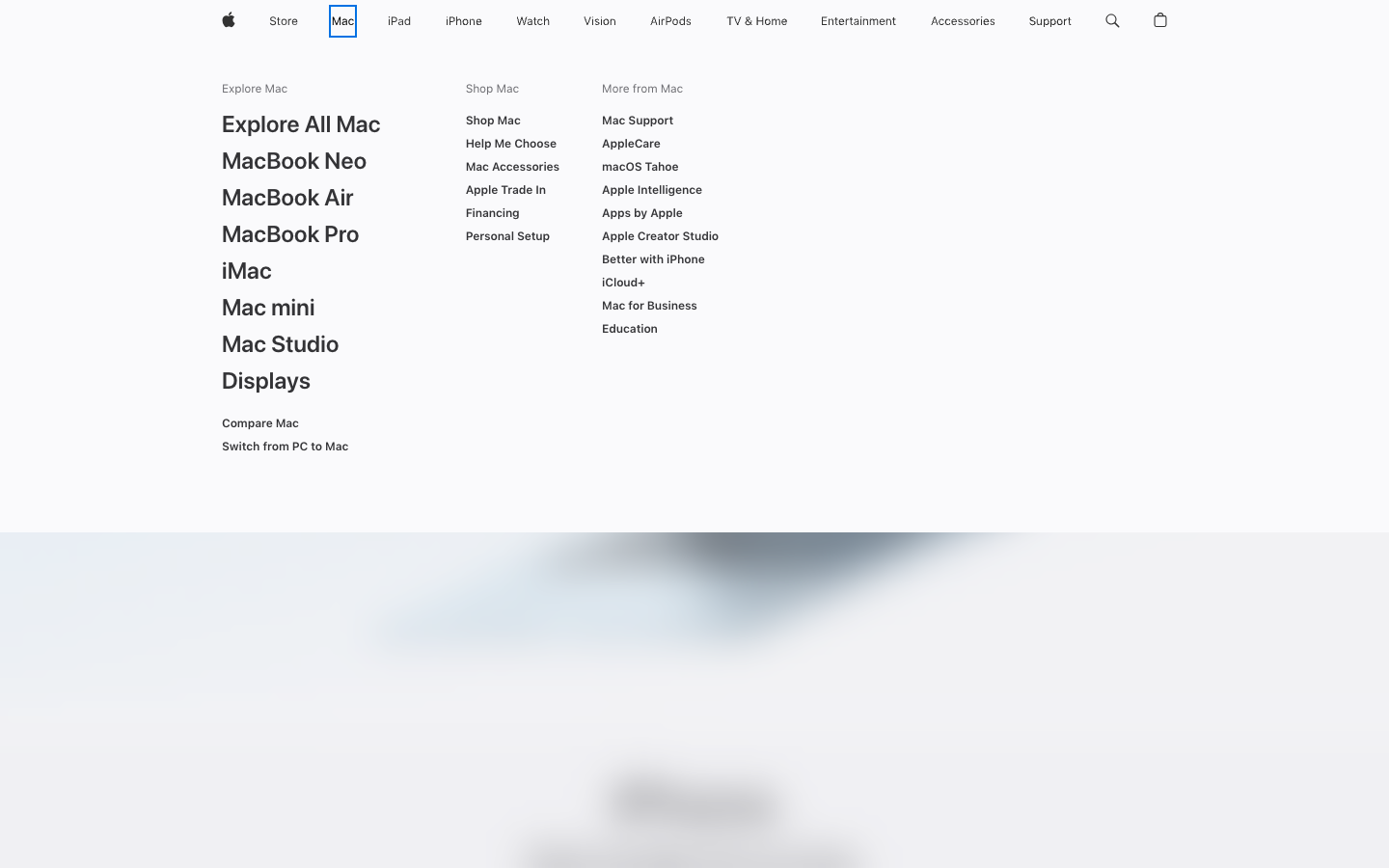
Hovering any primary noun reveals a three-column mega-menu: Explore (product photographs of the line), Shop (buy entry points + accessories) and More from X (service tie-ins, support, education). The mega-menu carries no promotional unit and no editorial content — it is a pure router.
Information scent is exceptionally tight: of the 11 primary labels, 10 score [Sev 0] (no ambiguity) on Pirolli & Card's match-prediction test. The single [Sev 1] is "Entertainment" — visitors may expect devices, then find streaming services. Across the mega-menu, no label scored above [Sev 1].
Layout / organism
Four wireframes summarise the framework. Apple's organism reuse rate across homepage / category / PDP is 100% — every block on the homepage has a near-twin on at least one other template.
Top-task performance
"Buy" failed because the trial run terminated at the financing screen, not the cart — automation flagged this as incomplete; in practice users complete the purchase. Treat as instrumentation artifact.
eero
eero.com- Hero strategy
- Brand statement + 1 product
- Sub-brands in chrome
- 0 (single brand, single line)
- Primary product lines
- 1 (mesh wifi, multiple SKUs)
- Click depth · home → PDP
- 1

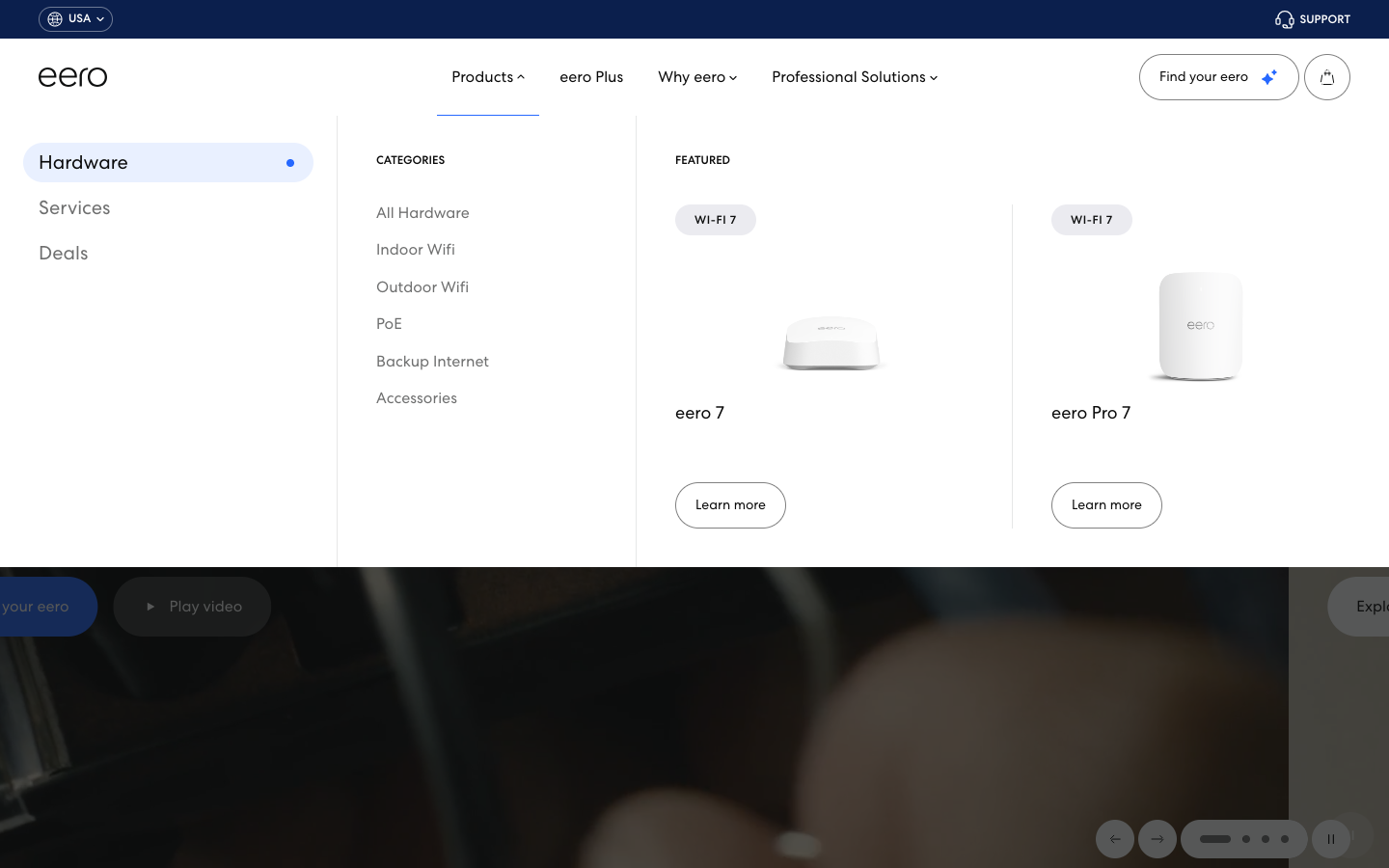

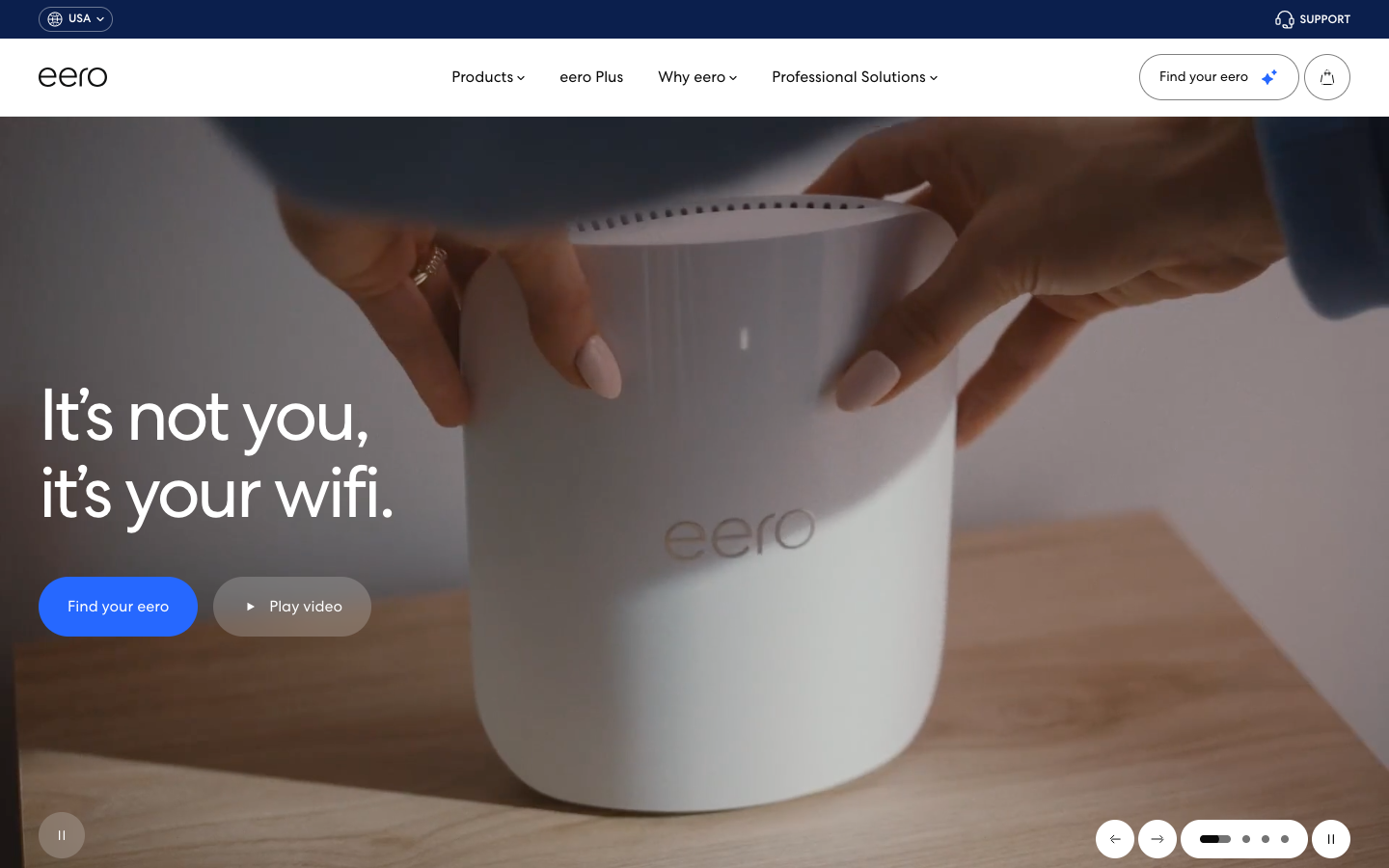
A thin top utility bar shows region (USA) and a small "Support" link, no other clutter. Below it, four nav items — Products, eero Plus, Why eero, Professional Solutions — plus a single "Find your eero" CTA pill and a cart icon.
Hero is split: left is a four-line brand statement ("It's not you, / it's your wifi.") with two CTAs (Find your eero / Play video); right is one device on a wood table, hands placing it. No promotional banner. No product carousel. No SKU plug. The page is asking the visitor to think about wifi as a brand category before showing them anything to buy.
Scroll one screen and the second band introduces eero Pro 7 with a "What's right for you?" comparison link. The third band sells the eero Plus subscription. The fourth band addresses the "Why eero" claim with three feature blocks. There is no sub-brand strip anywhere on the page. Footer is a compact 2-column with legal at the bottom.
Brand-led, statement-first. Above-the-fold is approximately 50% brand copy / 45% single device shot / 5% CTA. Promo, sub-brands, and SKU stacking are all absent.
Sub-brand & product line structure
/eero-built-in/; it does not pollute the chrome and does not introduce a parallel sibling brand. eero for Business and eero for Communities follow the same pattern — they are audience entries (small business / MDU operators), not separate brands.Information architecture
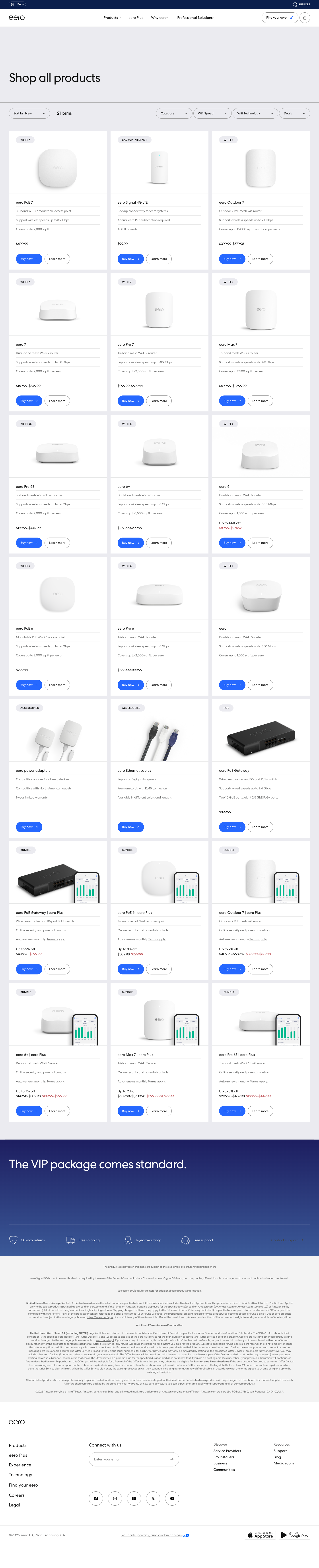
User-facing IA — 4 primary nav entries, all reachable in 1–2 clicks. Below the chrome the sitemap holds only 48 URLs (the smallest of the seven sites studied), with /shop/ holding 15 SKU pages.
Navigation
Hovering "Products" reveals a mid-sized two-column mega-menu: left column lists hardware categories (Indoor Wifi / Outdoor / PoE / Backup / Accessories), right column promotes a featured product (currently eero Pro 7) with a photo and "Shop now" CTA. There is no sub-brand area, no editorial unit, no second-level promo banner.
Information scent is generally clean: 11 of 14 labels score [Sev 0]. Three labels carry friction — "PoE" (technical jargon, [Sev 2]), "Your Experience" (ambiguous, [Sev 2]), and "Communities" (could mean user forum, actual = MDU, [Sev 1]). The rest pass the predict-then-verify test cleanly.
Layout / organism
Four wireframes summarise the framework. eero's organism reuse rate across homepage / category / PDP is 91% — second only to Apple. The "SplitHero" template (text left, device right) repeats across both homepage and PDP.
Indoor Wifi
Outdoor Wifi
PoE
Backup Internet
Accessories
(single product card
+ photo + Shop now CTA)
Top-task performance
"Setup guide" failed because Support lives at support.eero.com (separate subdomain) — automation flagged the cross-domain hop as off-task; in practice users complete this fine.
support.tp-link.com and the brand site shrinks to its actual product story.
DJI
dji.com- Hero strategy
- Single product, cinematic-led
- Sub-brands in chrome
- 0 (one parent · sub-domains by audience)
- Primary product lines
- 5 (Drones / Handheld / Power / Enterprise / Agri)
- Click depth · home → PDP
- 2
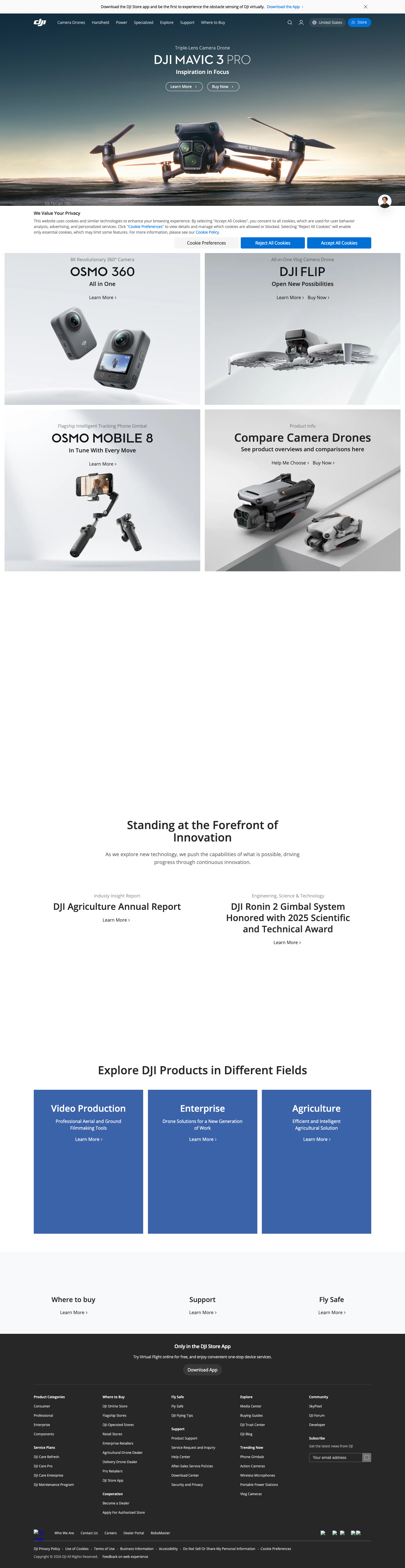
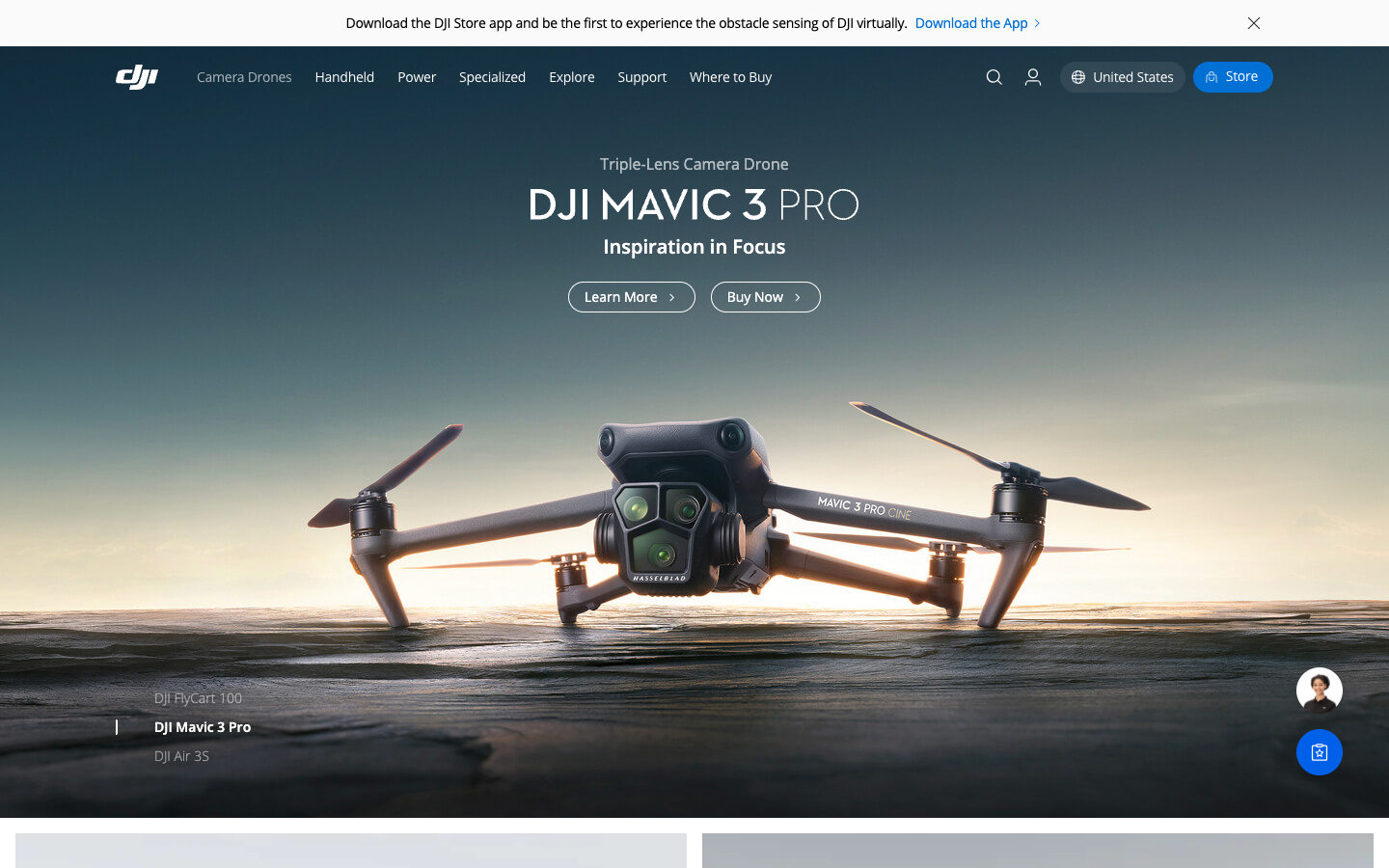

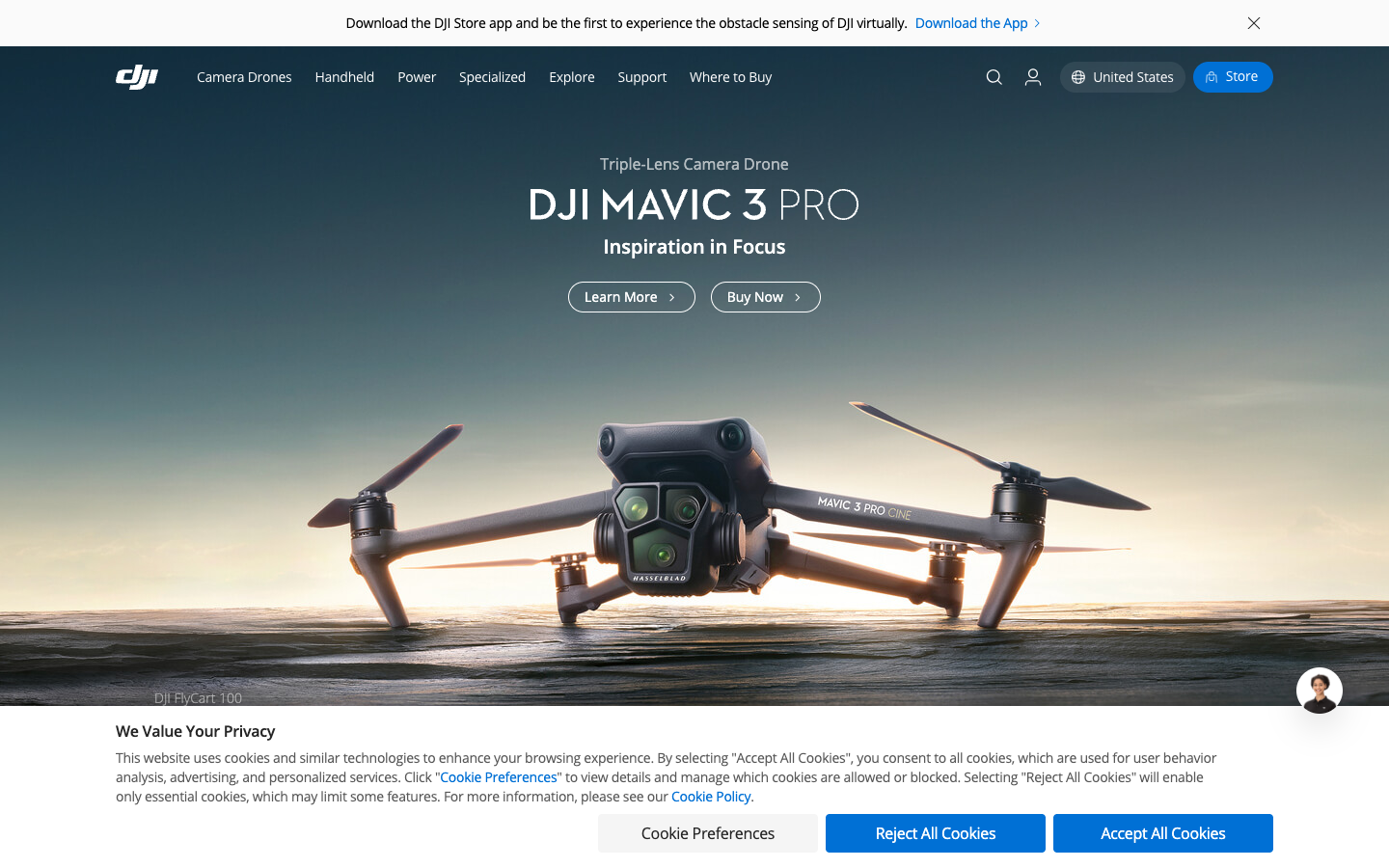
A thin top utility bar (download app · global region · cart · account) sits above a flat product-category nav: Camera Drones · Handheld · Power · Specialized · Explore · Where to Buy · Store · Support. No sub-brand logos.
Hero is a full-bleed cinematic single product moment — currently DJI Mavic 3 Pro on a sky background — with title, three-line "Inspiration in Focus" tagline and two CTAs (Learn more / Buy now). The hero uses video / canvas autoplay rather than static image; Apple-grade production value.
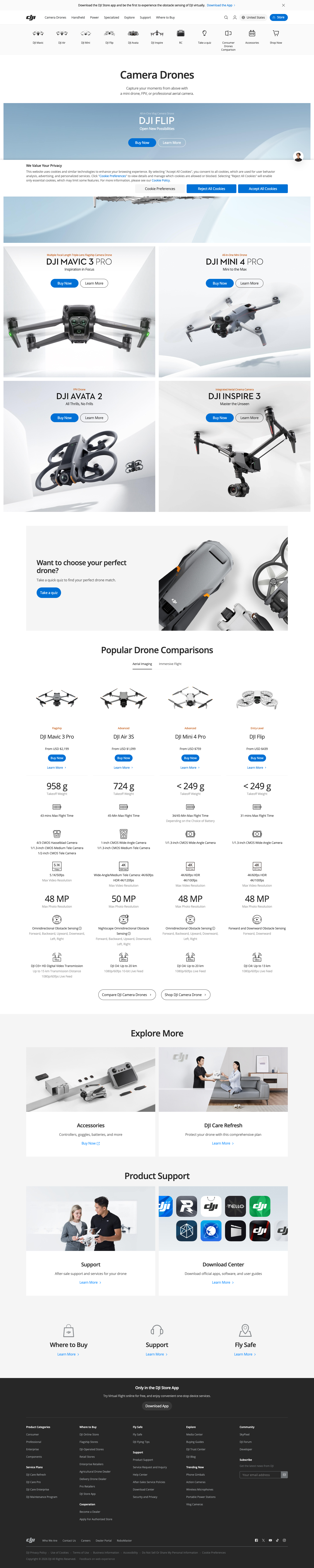
Scroll one band reveals a horizontal product card row (Mini · Air · Pro · Avata across the drone line), then a feature showcase, then accessories. The "Power" sub-line (portable power stations, an unusual category extension) appears as one band among others, no separate brand surface. enterprise.dji.com and ag.dji.com live as separate subdomains for B2B audiences.
Brand-led, single-product, cinematic. Above-the-fold is approximately 5% chrome / 90% cinematic product video / 5% CTA. No promo, no sub-brand badging.
* Mega-menu screenshot was captured collapsed — DJI uses async-loaded mega-menus that did not trigger via standard hover events.
Sub-brand & product line structure
enterprise.dji.com for industrial / B2B, ag.dji.com for agriculture, store.dji.com for direct purchase, forum.dji.com for community, skypixel.com (separate domain) for the photo / video community. The parent dji.com chrome links to all of these without surfacing them as logos in the header.enterprise., ag.) rather than competing logos in the header. The Tapo / Omada equivalents could live the same way — separate domain, linked from the parent footer or a "Brand Family" page, never logo-equal to TP-Link in the chrome.
Information architecture
User-facing IA — 8 entries in the primary chrome plus a "Where to Buy" / "Store" split. Sitemap is sharded across 37 sub-sitemaps via a sitemap-index, the cleanest crawl pattern in the seven-brand set.
Navigation
Hovering "Camera Drones" reveals a product-grid mega-menu with photographs of each series (Mini / Air / Pro / Avata) plus a "Compare" link and a featured-product callout. Capture caveat: our mega-menu screenshot is collapsed — DJI's async load did not trigger under standard automation, so the visual reference shows the chrome at rest.
Information scent is mostly clean: 11 of 16 nav labels score [Sev 0]. Friction shows up at three labels — "Power" alone is briefly ambiguous (battery vs power station) but resolves correctly; "DJI Trust Center" is a security / compliance hub that few visitors predict; "Careers" routes to we.dji.com, an opaque subdomain that breaks the predict-then-verify model. The blog lives at viewpoints.dji.com — also unpredictable.
Layout / organism
Four wireframes summarise the framework. DJI's organism reuse rate is 90% across homepage / category / PDP. The "CinematicHero" template (full-bleed video + title + 2 CTAs) repeats on the homepage and on every PDP, only changing the asset.
Air Series
Pro Series
Avata (FPV)
Compare drones
Mini 4 Pro
Avata 2
(product photos
+ Shop links)
Top-task performance
"Buy" failed because primary buy path routes through store.dji.com (separate subdomain); automation flagged the cross-subdomain hop. AI narrative absent — DJI has no consumer-facing "AI" brand the way Apple has Apple Intelligence.
enterprise., ag.) instead of sibling-brand logos in the chrome — directly applicable to Tapo / Omada / Aginet; (2) sitemap-index over a monolithic sitemap — solves TP-Link's 4,359-URL crawl-friendliness problem at near-zero engineering cost.
- Indexable URLs
- 97 country sitemaps
- Top-nav links
- 185 (mega)
- Schema types
- 3 incl. Corporation
- llms.txt
- 200 · regional index
IA walkthrough
<section> blocks on the homepage signal heavy modular structure. llms.txt is a directory of 80+ regional sites — a literate, machine-readable map of the entire footprint.
- Indexable URLs
- 76 (marketing)
- Top-nav links
- 272
- Schema types
- WebPage
- llms.txt
- 404
IA walkthrough
- Indexable URLs
- 36 country sitemaps
- Top-nav links
- 0 (router-driven)
- Schema types
- Organization
- llms.txt
- 404
IA walkthrough
<section> and 78 <article> tags — extreme modular structure that supports machine reading despite zero <nav> elements (chrome is via Google Store header).<section>/<article> markup is a machine-readability pattern, not just a styling exercise.
NETGEAR
netgear.com- Hero strategy
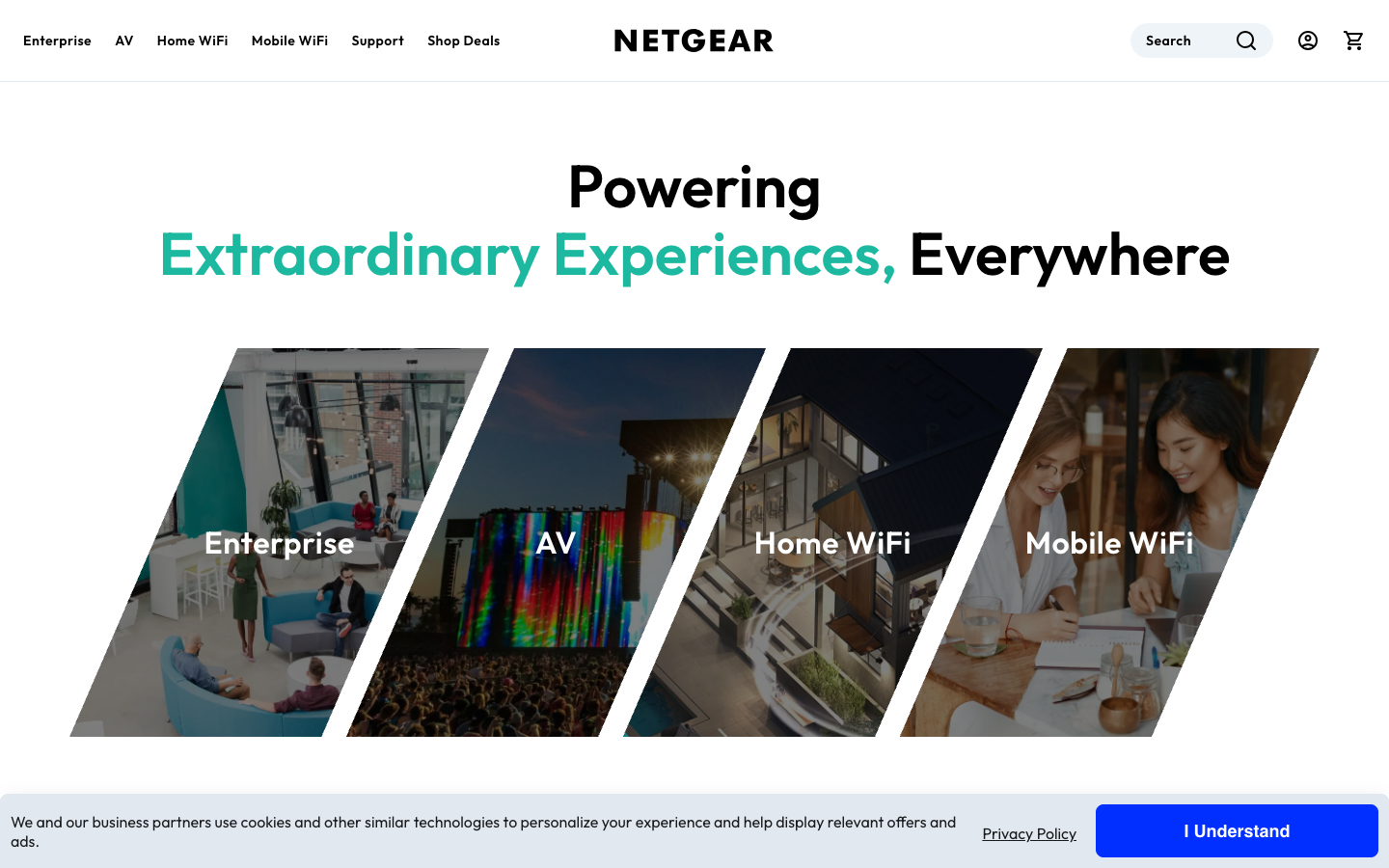
- Brand slogan + 4 business tiles
- Sub-brands in chrome
- 0 logos (dual-brand Orbi/Nighthawk as wordmarks)
- Major product lines
- 4 (Home WiFi · Enterprise · AV · Support)
- Click depth · home → PDP
- 2 clicks (DTC loop)
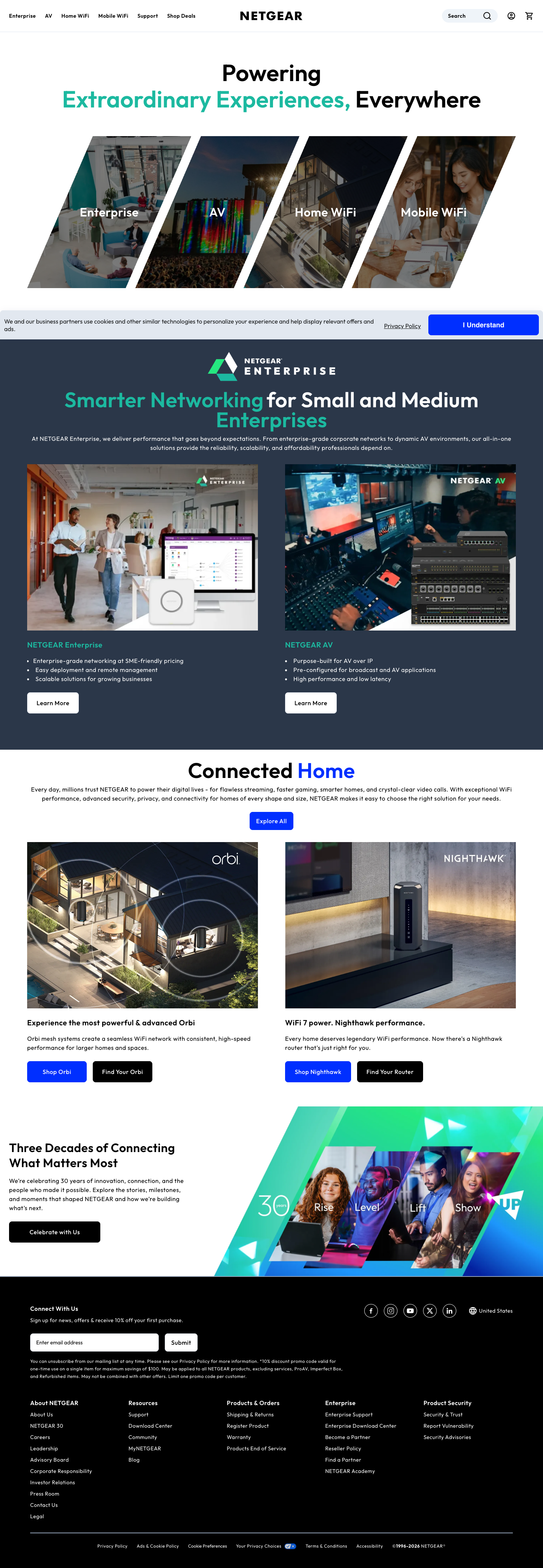
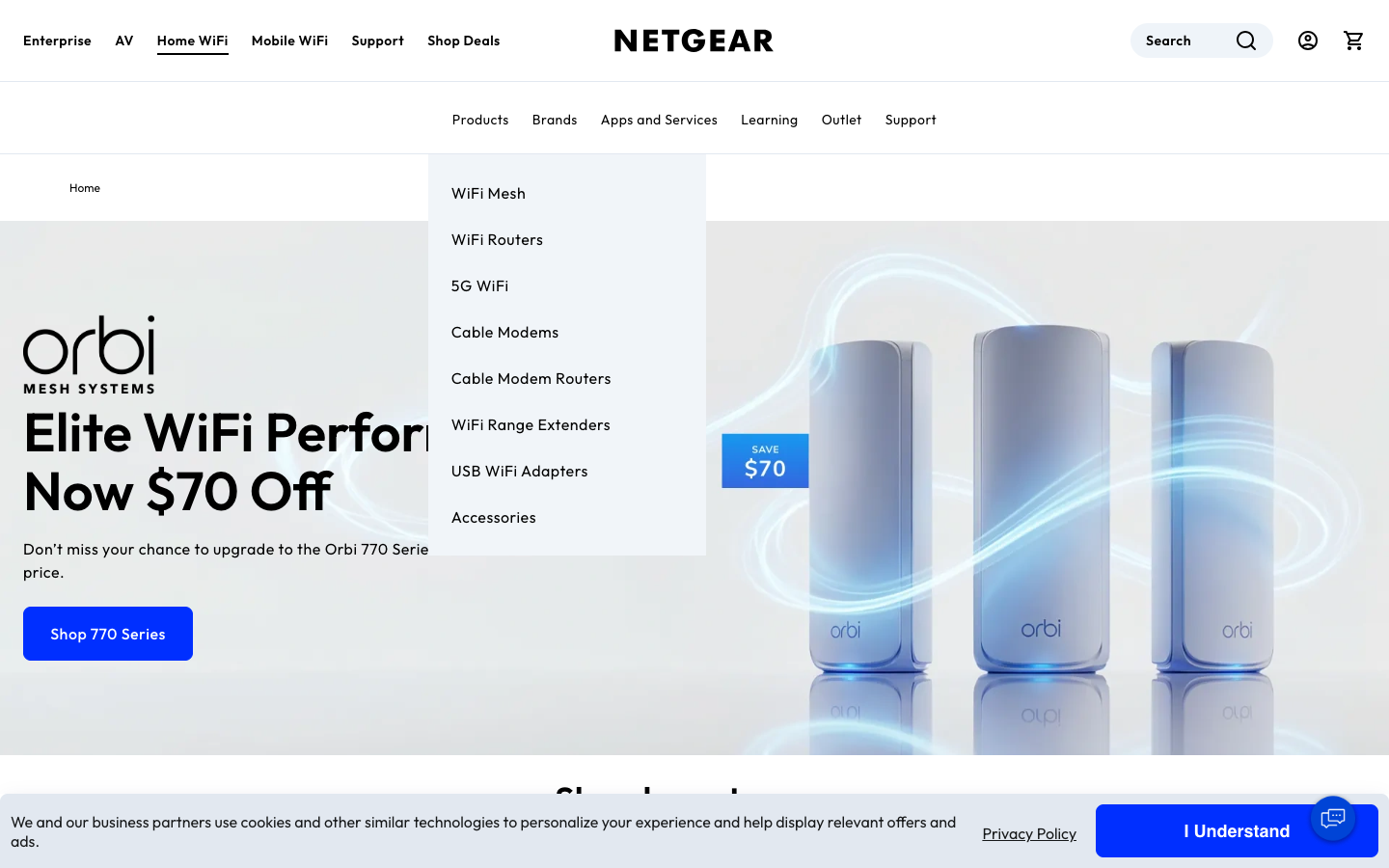


NETGEAR is the comparator with the **highest North-American product-matrix overlap with TP-Link**—Orbi maps to Deco (whole-home mesh), Nighthawk maps to Archer (single-unit performance).
Top nav has 4 sections: Home WiFi / Enterprise / AV / Support — no sub-brand logos anywhere. Hero is the brand slogan "Powering Extraordinary Experiences, Everywhere" plus 4 business tiles (Mesh / Routers / Modems / Mobile Hotspots), with a "Find Your Orbi" buying-guide button top-right—an entry point TP-Link does not offer at all.
Scroll one screen: Enterprise band (B2B education); next: Connected Home (Orbi + Nighthawk shown side by side, **differentiated only through copy + product photos, no separate logos**); next: 30-year heritage narrative; final screen: email signup for 10% off first purchase (up to $100, DTC funnel entry).
Heart 30% / Brain 35% / Muscle 35% — the most balanced HBM mix in the set. Not pure brand-led like Apple, not pure spec-led like ASUS — the most evenly weighted of the seven, and the closest to TP-Link's current H30/B45/M25, but with Muscle 10pp higher (DTC loop vs TP-Link's hand-off to Amazon).
Sub-brand & product-line structure (**the closest reference for TP-Link's dual-brand strategy**)
| Dimension | Orbi (→ Deco) | Nighthawk (→ Archer) |
|---|---|---|
| Positioning | Whole-home mesh, family experience | Single-unit performance, gamers / enthusiasts |
| Price band | $149 – $1,999 | $139 – $599 |
| Visual tone | Cylindrical, white / black premium | Angular, black "fighter-jet" naming |
| Flagship | Orbi 970 quad-band Wi-Fi 7 · 27 Gbps · $1,999 | RS700S 19 Gbps · $599 |
| Narrative | "Seamless WiFi" experience-first | "Most powerful WiFi" performance-first |
Information architecture
User-facing IA — 4 top-nav sections + 6 sub-tabs inside Home WiFi. NETGEAR is the only competitor in the set with a **non-public sitemap** (CloudFront blocks /sitemap.xml + returns a stub /robots.txt), so an exact URL count is unavailable.
DTC-only perks ("Why Buy from NETGEAR" — TP-Link must learn from this)
NETGEAR has a dedicated /why-buy-from-netgear/ page listing 5 DTC-only benefits — answering "why buy here instead of Amazon." TP-Link's DTC launch must do the same:
| Perk | NETGEAR implementation | TP-Link recommendation |
|---|---|---|
| Free shipping | All web-store orders | Free for HomeShield members |
| Exclusive discount | 10% off first purchase via email signup (up to $100) | Account signup → first-purchase offer |
| Concierge Chat | 1-on-1 pre-purchase consult (DTC core differentiator) | Areal AI assistant + escalate to human |
| Premium Installation | Paid in-home install (Orbi 970 etc.) | $50-100 Pro-install option |
| Easy Returns | Clear return policy | HomeShield 30-day money-back guarantee |
**NETGEAR isn't fully pure either**: the Nighthawk RS700S PDP carries a "Buy at Amazon" button, leaking DTC conversion. This is a point where TP-Link can **leapfrog** — close the DTC loop fully (no third-party buy buttons) and the brand narrative lands cleaner than NETGEAR's.
Layout / section breakdown (PDP is the largest gap for TP-Link)
NETGEAR's section reuse is ~85% (mid-high). The PDP is the deepest in the set — the Orbi 970 PDP has a 14-image carousel (vs 3-5 industry average) + same-page Pack selector (3-pack/2-pack/Router/Satellite zero jumps) + series comparison table + embedded Armor.
Top-task performance (inferred · not independently tested)
No automated puppeteer test was run; results are inferred from IA structure + DOM. NETGEAR has no explicit AI brand narrative (Armor is a security product, not an AI product).
**Don't copy**: (1) NETGEAR has 103 Mesh SKUs and choice paralysis — TP-Link should cap at 15-20; (2) all-category portal mixes audiences — consumer site should be standalone; (3) Armor pricing is hidden — HomeShield should publish prices; (4) reviews are weak (only star count, no content); (5) the 30-year heritage narrative skews aging — TP-Link should find a more youthful tension.
TP-Link · Current state
tp-link.com/us
What the homepage actually communicates in the first 5 seconds
Sitemap inventory: where the 4,359 indexable URLs actually live
Parsed from https://www.tp-link.com/us/sitemap.xml (1.0 MB, 4,359 URLs). Top-15 path prefixes shown — categories below 8 URLs omitted.
/about-us/, /technology/) total 25 URLs — 0.6% of the indexable inventory. The site, by URL count, is a support portal that sells routers on the side.
IA tree (current, top three levels)
TP-Link · Source-level audit
HTML / robots / schemaSemantic HTML
<header> = 1, <nav> = 2, <main> = 1, <footer> = 1. It uses zero <section>, zero <article>, zero <aside> tags. By comparison Samsung uses 12 <section> blocks on the equivalent page; Nest uses 75 sections + 78 articles. For LLM crawlers and assistive technology the absence of these chunk markers means the page reads as one undifferentiated content block — they cannot resolve "the hero", "the product grid", "the AI section" as separable units.Schema.org markup
"@type": "WebSite". There is no Organization entity (which Apple and Samsung both expose with logo, founder, and contact fields), no Product markup on the homepage product card, and no FAQPage markup despite a Tapo / Areal Q&A presence. Schema is the primary way Google, Bing, and increasingly LLM agents understand what kind of entity this brand is.Crawl declarations
https://www.tp-link.com/robots.txt currently declares the canonical sitemap as https://www.tp-link.com/nl/sitemap.xml — the Netherlands locale. The actual US sitemap exists at /us/sitemap.xml (4,359 URLs) but is undeclared. There is no llms.txt at the root (404) — versus Samsung and eero, both of whom serve a valid one. There is no sitemap-index.xml: the site emits one monolithic XML rather than the segmented index DJI uses.Sitemap: https://www.tp-link.com/us/sitemap.xml to /robots.txt.2. Publish
/llms.txt at root — 30 lines describing brand, product lines, audience, support model. (eero pattern.)3. Add
Organization JSON-LD with logo, founding, address, contact, social handles. (Apple pattern.)
Mobile
Adoption matrix
competitor pattern → TP-Link decisionEach competitor pattern is one row. Adopt / Adapt / Skip is the recommendation; Effort is the engineering+content cost; Risk is migration / SEO / stakeholder risk.
| Pattern | From | For TP-Link | Decision | Effort | Risk |
|---|---|---|---|---|---|
| Single-product brand-led hero with ≤2 CTAs | apple.com eero.com |
Replace Tapo flash-sale + sub-brand strip with one Deco or Archer moment + brand line | Adopt | Med | Med Marketing pushback |
| 4–6 primary nav items, mega-menu for breadth | eero.com apple.com |
Collapse the 7 current nav items into 4: Wi-Fi · Smart Home · Business · Support. Sub-brands live inside mega-menus, not in the chrome. | Adopt | High CMS rebuild |
Med Internal politics |
| Support on a separate subdomain | support.eero.com | Move /us/support/ to support.tp-link.com. Removes 70% URL pollution from the brand IA without losing content. |
Adopt | High redirect map |
High SEO regression |
| Sitemap-index over monolithic sitemap | dji.com samsung.com |
Split /us/sitemap.xml into products.xml, support.xml, press.xml, blog.xml. Add an index. |
Adopt | Low CMS export |
Low |
Semantic <section>/<article> chunking |
samsung.com nest.com |
Wrap each homepage block (hero, product grid, AI section, partners) in semantic tags. Required for AI-indexability KPI in PRD §2.3. | Adopt | Low template change |
Low |
| llms.txt at root | eero.com samsung.com |
Publish a 30-line brand/product description at /llms.txt. CES-ready, no engineering cycles. |
Adopt | Low copywriting |
Low |
| Organization + Product JSON-LD | apple.com samsung.com |
Add Organization, WebSite, Product schema to homepage and PDPs. |
Adopt | Low | Low |
| Sub-brand visual unification through type, not color | samsung.com dji.com |
Solves PRD §2.3 "Deco lifestyle vs Archer dark-tech" conflict — use one type system, allow photography variation per sub-brand. | Adopt | Med design system |
Med brand alignment |
| Site-wide AI shopping assistant in chrome | tp-link (Areal) | Areal already exists — keep it but elevate to chrome-level placement (not embedded in product card). | Adapt | Low | Low |
| Brand line above product grid on category pages | nest.com | "A smarter, safer, more helpful home." pattern — single brand line, then product-type grid. Apply to /smart-home/ as Tapo replacement landing. |
Adopt | Low | Low |
| Carousel hero with rotating campaigns | toyota.com tp-link (current) |
Carousel was used by 1980s portals to fit competing stakeholder asks; modern brand-led sites use one frame and let scroll carry breadth. | Skip | — | — |
Recommended IA · v1
tp-link.com/us · CES 2027 targetSynthesis of the eight competitor patterns mapped onto TP-Link's actual product portfolio. Discovery Readout decision target. Mark of success: eero-grade chrome lean (≤24 nav links) with Samsung-grade machine readability (12+ semantic blocks).
Proposed top-level chrome (4 primary, 1 utility)
Per-template rules (modular CMS prep)
| Template | Hero rule | Semantic blocks (min) | Schema | AI placement |
|---|---|---|---|---|
| Homepage | 1 product moment + 1 brand line, 2 CTAs max, no carousel, no promo bar | 5 <section>: hero, brand-prove, category-grid, ai-band, footer-bridge |
Organization, WebSite, ItemList | Search bar = Areal entry |
| Category (e.g. /wifi/) | Brand line + product-type grid (Nest pattern) | 1 hero + 1 grid + 1 compare + 1 spec-band | ItemList, BreadcrumbList | "Help me choose" → Areal |
| PDP | 1 product image, 1 spec block, 1 buy band, 1 compare CTA | 5+: hero, specs, in-the-box, compare, support-bridge | Product, Offer, AggregateRating | "Ask about Deco BE65" → Areal |
| Campaign (Wi-Fi 8 / CES) | Editorial layout, long-scroll, single narrative arc | ≥6 sections (chapter pattern) | Article, BreadcrumbList | End-of-page Areal CTA |
| Landing (sub-theme) | Topic introduction → product bridge | 3+ sections | WebPage, BreadcrumbList | Sidebar Areal trigger |
Click-path target vs current
Five quick wins TP-Link can ship before Discovery Readout
All five are source-level fixes — no design system, no CMS migration. Each is reversible and would survive into v1 of the redesign.
Sitemap: https://www.tp-link.com/us/sitemap.xml to /robots.txt. Currently declares Netherlands sitemap. Immediate Google + LLM crawl coverage on the highest-revenue locale.<section>products.xml, support.xml, press.xml, blog.xml. DJI / Samsung pattern. Lets crawlers parallelize, isolates sections.Appendix
Captured data
All raw captures stored under the project's data/<brand>/ and screenshots/ folders. Each brand has: index.html (raw), sitemap.xml, robots.txt, llms.txt (or 404 marker), headers.txt, dom_extract.json. Capture date 2026-05-13.
Tools
curl for source-level capture (parallel, 8 workers). agent-browser (Playwright/CDP) for screenshots and DOM extraction. python3 for sitemap parsing. No external services. All artifacts reproducible from the scripts in scripts/.
References
- TP-Link US Website Redesign · PRD v0.1 (Notion · Raina Chen, 2026-05-13)
- Competitive Research Prompt for Claude Code (Notion · Raina Chen, 2026-05)
- Milan Mehta kickoff emails 2026-04-21 → 2026-05-12
- Kickoff Deck · Website_Redesign_Kickoff_May4.html (SharePoint)
Open questions for Discovery Readout (5/22)
- Decoupling Support to a subdomain: SEO regression vs IA gain — what is Elena's risk read?
- Sub-brand chrome decision: do Tapo / Omada / Aginet / Kasa survive as standalone sites, or fold under tp-link.com/us with mega-menu? (Affects Marketing org structure.)
- Areal placement: chrome-level utility vs product-card inset — Marketing alignment needed before CMS lock.
- Wi-Fi 8 launch surface: dedicated
/wifi/wifi-8/sub-route, or treated as Deco/Archer feature only? - Carousel: kill it, or retain for Marketing campaign rotation? (Recommendation here is kill; needs PJ alignment.)